How to find clothes from an Instagram Reel: every method, step by step
Four ways to find an outfit you saw in an Instagram Reel: check the caption and tags, ask the creator, use Google Lens, or let FOUND find every piece.
On this page
- Key takeaways
- What should you check before searching anywhere?
- How do you ask the creator without being ignored?
- How do you search an outfit with Google Lens?
- How do you find clothes from a Reel with FOUND?
- Which method should you use?
- What if nothing matches exactly?
- What are the most common mistakes?
- The short version
The short answer
To find clothes from an Instagram Reel, first check the caption, tags and comments for a product link, then ask the creator. If that fails, screenshot a clear frame and search it with Google Lens, or share the Reel to FOUND, which finds every piece and shows products from Indian online stores.
Key takeaways
- Start with the free clues: caption, tagged accounts, pinned comments and the creator’s bio link.
- Ask the creator with a short, specific message that names the piece and the timestamp.
- For a manual search, pause on a sharp frame, crop to one piece and search it with Google Lens.
- FOUND does this for the whole video at once: every outfit, every piece, products from Indian stores, with honest match labels.
- If nothing matches exactly, search by cut and fabric words for close alternatives.
You’ve watched it four times. The jacket is perfect, the trousers sit just right, and the creator hasn’t said a word about where any of it came from. This guide walks through every method that works, from the free checks that take ten seconds to letting an app do the whole thing for you.
What should you check before searching anywhere?
The fastest answer is often already on the screen. Before you start any search, spend a minute on the Reel itself.
- Read the full caption. Tap “more”. Creators often list brands at the end, sometimes after a long line of hashtags.
- Look at the tags. Tagged accounts can include the brand, the stylist or a boutique. Where Instagram shopping is available, a Reel may also carry product tags that open a product page.
- Open the comments. Look for a pinned comment from the creator, and search the replies. Someone has usually asked “jacket details?” before you, and the creator may have answered.
- Check the bio link. Many creators keep a link page or storefront with the products from recent posts.
- Look at Highlights. Fashion creators often save “links”, “outfit details” or “shop” Highlights.
How do you ask the creator without being ignored?
Creators get many messages. A short, specific question is the one most likely to get a reply.
- Name the piece and the moment. “Hi! Where is the olive overshirt from, in your Reel at 0:07?” is easier to answer than “outfit details pls”.
- Comment publicly if DMs are closed. A public answer also helps everyone else who wanted to ask.
- Don’t expect a link for everything. Some pieces are old, gifted, custom-made or from a local market. If that’s the answer, you’ll need an alternative, which is where the next two methods come in.
How do you search an outfit with Google Lens?
Google Lens searches with a picture instead of words. It’s built into the Google app, Google Photos and Chrome on Android, and it can find products that look like what’s in your screenshot.
- Pause on a sharp frame. Pick a moment where the piece is still, well lit, and not covered by hair, a bag or a hand.
- Take a screenshot.
- Open it in Google Lens and drag the selection box so it covers only one piece, say the shoes. A tight crop gives far better results than the whole outfit.
- Add words if you can. Lens lets you add text to your search. Words like “kurta set”, “wide-leg trousers” or “India” can narrow results to what you want. Not sure what the piece is called? Our fashion terms glossary will help.
- Repeat for every piece. Jacket, top, bottoms, shoes, bag: each one is its own search.
This works, and it’s free. The catch is effort. A five-piece outfit is five screenshots, five crops and five sets of results to sort through, many of them from stores that don’t ship to India. And if the outfit changes halfway through the Reel, you start again.
How do you find clothes from a Reel with FOUND?
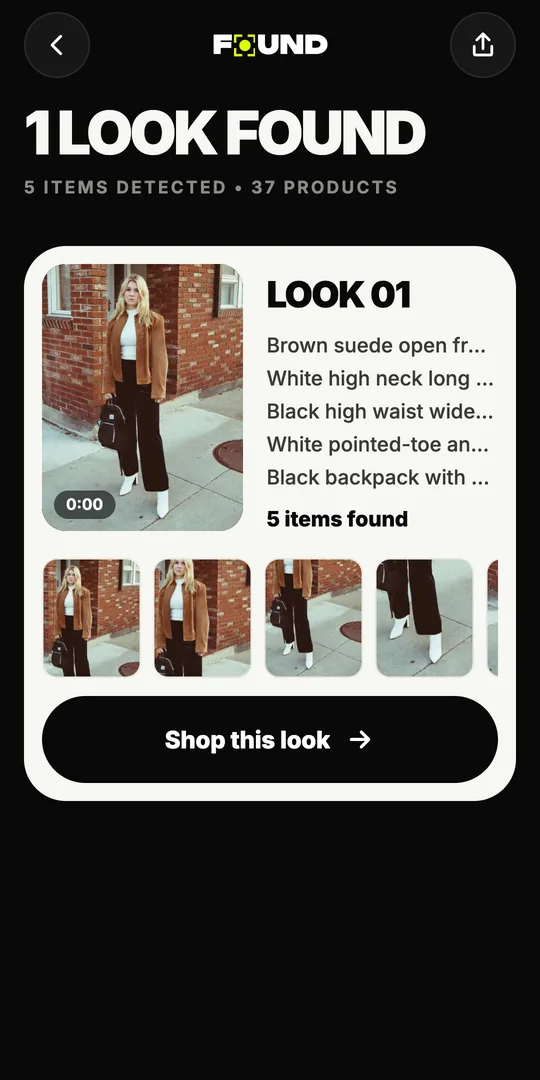
FOUND is a free Android app by Sitio Labs that does the whole process for you. It looks at the video, finds every outfit and every piece, and searches Indian online stores for each one.
- Send the Reel. In Instagram, tap the share button on a public Reel and pick FOUND. You can also copy the Reel’s link and paste it into the app, or upload a video or screenshot from your gallery.
- FOUND reads the video on your phone. The app picks up to 12 still frames from the video and uploads only those frames, not the video.
- Every look is broken down. The AI finds each outfit in the video and each piece in it: outerwear, tops, bottoms, dresses, ethnic wear like kurtas, sarees and lehengas, shoes, bags, sunglasses, jewellery and hats.
- Each piece gets its own results. FOUND searches by image and by text, then ranks products from stores like Myntra, AJIO, Amazon.in, Meesho, Nykaa Fashion and Tata CLiQ.
- Check the label. Every product says “Likely match”, “Very similar” or “Similar”, so you know how close it is. Here’s what each label means.
- Shop the look. Pick one option per piece and FOUND adds up the total for the prices it knows. Then buy on the store’s site, or save the look for later.
The best clue is often already in the caption. The best search is the one that covers every piece at once.
Store details like the ₹ price, stock, delivery time, returns and rating appear when the store lists them. FOUND doesn’t make them up when a store leaves them out. If you want to know what’s happening behind the scenes, we wrote a plain-English explainer on how outfit-finding AI works.
Which method should you use?
Each method has a job. Most people use two or three together.
| Method | Effort | Best when | Limits |
|---|---|---|---|
| Caption, tags, comments | Very low | The creator shares links | Many Reels have no product details |
| Ask the creator | Low, but you wait | One specific piece you love | Replies aren’t guaranteed |
| Google Lens | Medium, per piece | One clear item in one frame | Manual cropping; results aren’t limited to Indian stores |
| FOUND | Low | Whole outfits, several pieces, Indian stores | Public Reels only; Android only for now |
What if nothing matches exactly?
Sometimes the exact piece simply isn’t for sale online. It might be from an older collection, a small boutique, a tailor or a street market. That’s not a dead end.
- Look at the “Similar” results. They share the overall look, often at a different price point.
- Search by what makes the piece work. “Rust linen shirt with camp collar” will find more than “shirt from that Reel”. Our guide to shopping the look on a budget goes deeper on this.
- Try a better frame. If a piece was partly hidden, upload a screenshot where it’s fully visible.
- Check the fit, not just the look. Before you buy, read the size chart and the return policy.
What are the most common mistakes?
- Searching the whole outfit as one image. Visual search works best on one piece at a time.
- Trusting the colour on screen. Filters and lighting change colours. Check product photos taken in daylight, and customer photos where the store shows them.
- Skipping the seller check. On marketplaces, look at who is selling the product, not just the brand name in the title.
- Using private Reels. No outfit finder can see a private Reel. Use a screenshot instead, where the creator is happy for you to.
The short version
Check the caption, tags and comments first. Ask the creator if you can. For a single piece, Google Lens on a cropped screenshot works well. For the whole outfit, and for results from stores that deliver in India, share the Reel to FOUND. It’s free on Android: get FOUND on Google Play.
Seen it in a Reel?
Find it.
Share any public Instagram Reel to FOUND. It finds every piece and shows where to buy it from Indian stores. Free on Android.