FOUND vs Google Lens
FOUND vs Google Lens: which should you use to find an outfit?
An honest comparison of FOUND and Google Lens for finding outfits: Reels and video, every piece at once, Indian stores and match labels. When to use each.

Found: Find outfits from reels · on Android and in your browser, iPhone included · free plan, no Instagram login
The short answer
Use Google Lens when you have one clear photo of one item, or want to search anything beyond fashion. Use FOUND when the outfit is in an Instagram Reel or video: it reads up to 12 frames, finds every piece at once, searches Indian stores and labels how close each product is. Many people use both.
By FOUND Editorial at Sitio Labs · Updated
What is the difference between FOUND and Google Lens?
Google Lens is a general visual search tool from Google. You point it at a photo, a screenshot or your camera, and it finds visually similar images, products and pages from across the web. It works for almost anything: a plant, a landmark, a sign to translate, a lamp, or a jacket.
FOUND does one narrower job. It’s an outfit finder by Sitio Labs, listed on Google Play as Found: Find outfits from reels and also available in your browser. You give it a public Instagram Reel link, a video or a screenshot; it reads up to 12 still frames, finds every outfit and each piece in it, and searches Indian online stores for each one.
The honest summary: Lens is the better general tool, and FOUND is built for one specific situation, an outfit you saw in a Reel that you want to buy in India.
How do FOUND and Google Lens compare?
| Google Lens | FOUND | |
|---|---|---|
| Made for | Visual search of almost anything | Finding outfits from Reels and videos |
| What you give it | A photo, a screenshot or your camera | A public Reel link, a video or a screenshot |
| Video and Reels | Pause and screenshot the moment you want | Reads up to 12 frames from the video itself |
| Pieces per search | The object you select; you can move the box to another | Every piece of every outfit it finds, at once |
| Where results come from | Pages and stores across the web | Indian online stores, with prices in ₹ when listed |
| How close is it? | You judge from the results | Each product labelled Likely match, Very similar or Similar |
| Whole outfit total | No | Shop this look adds up one option per piece |
| Cost | Free | Free plan with 3 analyses a month; Plus ₹99 and Pro ₹249 a month |
| Where it works | Google app, Chrome, Google Photos and more | Android app, and any browser including on iPhone |
Where is Google Lens the better choice?
Lens is excellent at several things, and there’s no reason to switch tools when it fits:
- One clear photo of one item. If you have a sharp product shot of a single bag, Lens is fast and often lands on the exact listing.
- A visible logo or label. When the brand is readable, Lens tends to find the product page quickly.
- Anything that isn’t clothing. Furniture, plants, food, text and translation are outside what FOUND does.
- Finding where an image came from. Lens can show other places a picture appears online, which can lead you back to the original post or creator.
- Shopping outside India. Lens isn’t limited to Indian stores.
It’s also free, already on many phones, and doesn’t need an account.
Where is FOUND the better choice?
FOUND is built around the problems that come up when the outfit is in a video:
- It reads the video for you. Instead of hunting for the right moment to screenshot, FOUND picks up to 12 still frames from the Reel, so it can see the outfit from more than one angle.
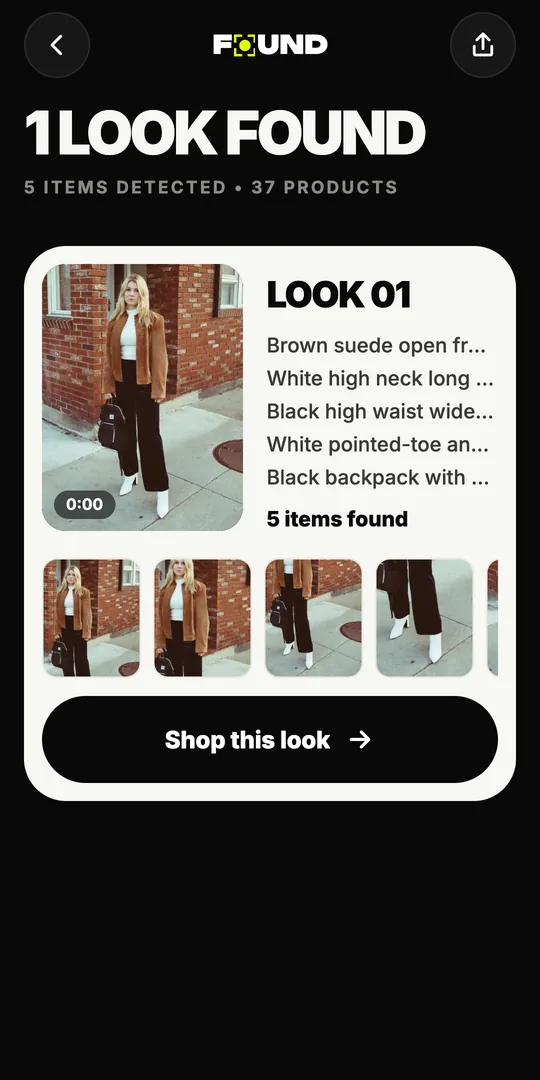
- It finds every piece at once. The jacket, the top, the trousers, the shoes, the bag and the sunglasses each come back as their own piece, without cropping and searching six times.
- It focuses on Indian stores. Results come from stores like Myntra, AJIO, Amazon.in, Meesho, Nykaa Fashion and Flipkart, with price in ₹, stock, delivery and returns when the store lists them.
- It tells you how close each product is. Every product is labelled, and FOUND never claims an exact match is guaranteed. Read what each label means.
- It adds up the look. Shop this look lists one option per piece with the total for the prices that are known.
Under the hood, FOUND uses Google Lens as its image search, alongside a description search through Google Shopping. So this isn’t a contest between two search engines. FOUND is a layer on top that handles the video, the pieces, the Indian stores and the labels. More on that in how outfit-finding AI works.
How do you find an outfit with Google Lens?
If you’d rather do it by hand, this works well:
- Pause the Reel on the sharpest moment, with the piece fully in view, and take a screenshot.
- Open the screenshot in Google Lens (in the Google app or Google Photos, for example).
- Drag the selection box around one piece, like the jacket.
- Look through the shopping results, and check which stores deliver in India.
- Repeat for each piece you want.
Our guide to finding clothes from an Instagram Reel covers this method and the others, like checking tags and asking the creator.
How do you do the same with FOUND?
- Share the public Reel to FOUND from Instagram (Android app), or copy its link and paste it into FOUND in the app or at found.clikit.store/app.
- Wait while FOUND reads the frames and finds every outfit and piece.
- Tap a piece to see products from Indian stores with their labels, or tap Shop this look for the whole outfit.
The full flow, with screenshots, is on the reels to outfit page.
Can you use both?
Yes, and it’s often the smartest approach. Start with FOUND to get the whole outfit from the Reel in one go. If one piece only comes back as Similar and you want to keep looking, screenshot that piece and try it in Lens too. And if you want to find the original creator of a reposted video, Lens’s image search can help with that.
What FOUND doesn’t do is worth knowing as well: it has no cart or checkout, no filters or price alerts, and it works with public Reels only. You always buy on the store’s own website.
Is it private?
FOUND never asks for your Instagram login. From a video it uploads only the still frames it picked, never the full video, and deletes them within 24 hours. You can try the demo Reel without an account. Try it free in your browser with a Reel you’ve saved, and compare the results with Lens yourself.
Is FOUND better than Google Lens?
Not in general. Google Lens is a broad visual search tool, while FOUND does one job: turning an outfit in a Reel or video into products from Indian stores.
For a single item in a clear photo, Lens is quick and free. For a whole outfit in a Reel, FOUND saves the screenshots and the one-piece-at-a-time searching.
Does FOUND use Google Lens?
Yes. FOUND searches by image with Google Lens and by description with Google Shopping, then ranks and labels the results.
What FOUND adds is everything around the search: picking frames from a video, finding every piece, focusing on Indian stores and labelling each match.
Can Google Lens find clothes from an Instagram Reel?
It can if you pause the Reel, take a screenshot and search it, usually one piece at a time.
Reel links can’t be pasted into Lens the way they can into FOUND, so a screenshot is the usual route.
Is Google Lens free?
Yes, Google Lens is free to use. FOUND has a free plan with 3 analyses a month, and the demo Reel is always free.
For more, FOUND Plus is ₹99 a month for 30 analyses and Pro is ₹249 a month for 100.
What about Pinterest Lens or Amazon’s visual search?
They’re visual search tools inside their own apps: Pinterest Lens finds similar Pins, and Amazon’s camera search finds products on Amazon.
They’re useful for ideas or for shopping one store; FOUND searches across Indian online stores for every piece in a Reel.